
Some of the best HubSpot updates aren't the flashy AI announcements or major platform overhauls.
They're the updates that save you a few clicks dozens of times per day.
HubSpot's new Property Context Menus, currently available in public beta and expected to be generally available later this month, fall squarely into that category.
At first glance, it's a small user experience improvement. In practice, it's one of those enhancements that removes friction from everyday work across sales, service, marketing, and operations teams.
What's Changing?
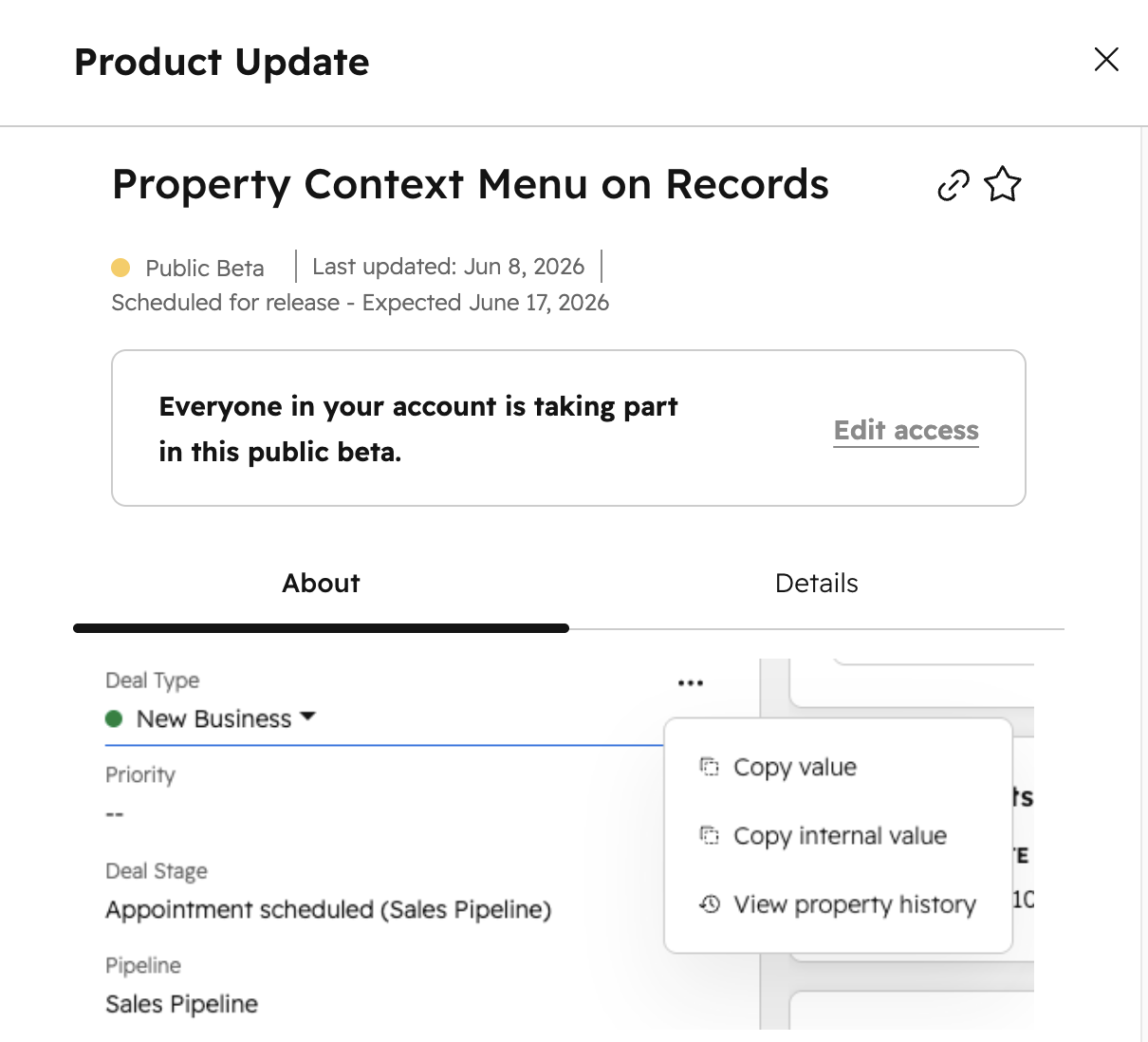
HubSpot is introducing a quick-action menu directly on record properties.
When viewing a record, users can hover over a property and click the three-dot menu to access actions such as:
- Copy property value
- Copy internal property value
- View property history
- Call a phone number
- Send an email
- Open a website URL
The available actions will vary depending on the property type, but the goal is consistent: reduce the number of clicks required to complete common tasks.
Why This Matters
If you've spent enough time in HubSpot, you've probably encountered situations like these:
- Needing to copy a property value into an email, Slack message, or internal document
- Looking for the exact moment a lifecycle stage, status, or owner changed
- Opening a contact record just to click an email address or phone number
- Navigating to property settings to find an internal property name
None of these tasks are particularly difficult.
They're just repetitive.
And repetitive friction is exactly what good user experience design should eliminate.
Instead of navigating away from a record, opening another screen, or digging through settings, users can now complete many of these actions directly from the property itself.
A Win for Operations Teams
One of the more interesting use cases is for HubSpot administrators and operations professionals.
The ability to quickly copy an internal property value directly from a record may seem minor, but it can save time when:
- Building workflows
- Creating reports
- Troubleshooting automations
- Documenting portal configurations
- Working with integrations and APIs
For teams managing complex portals with hundreds of custom properties, those small time savings add up quickly.
Better Visibility Into Property Changes
Another valuable addition is easier access to property history.
Understanding when a property changed—and what it changed from—can be critical when troubleshooting workflows, investigating reporting discrepancies, or understanding customer activity.
Previously, viewing property history often required several clicks and navigating away from the task at hand.
Now, that information is available directly from the property menu.
The Best Updates Are Sometimes the Smallest
HubSpot has spent the last year making meaningful investments in platform usability, and this update continues that trend.
Property Context Menus won't fundamentally change how anyone uses HubSpot.
What they will do is make common actions faster, easier, and less frustrating.
Those incremental improvements are often the difference between software that feels cumbersome and software that feels intuitive.
And if you've ever been annoyed trying to copy a property value in HubSpot, you'll probably appreciate this update immediately.
Availability
Feature: Property Context Menus on Records
Status: Public Beta
Expected General Availability: June 17, 2026
Availability: All hubs and all subscription tiers
If the beta is available in your portal, it's worth enabling. This is one of those updates you'll start using immediately and quickly wonder how you ever worked without it.