
Your Events Are Part of Your Marketing Strategy. Your HubSpot Reporting Should Reflect That.
How to connect trade shows, conferences, and networking events to marketing campaigns, pipeline, and revenue in HubSpot.
I've spent a significant part of my career working at the intersection of marketing and events, and one thing I've learned is that events don't happen in isolation. A successful trade show or industry conference might involve months of planning, promotional emails, social media, landing pages, sales outreach, and post-event follow-up. The event itself might only last a few days, but the marketing activity surrounding it extends well beyond those dates.
Yet when it comes time to report on marketing performance, offline events are often reduced to a few familiar metrics: registrations, attendees, badge scans, or leads collected.
Those numbers matter, but they don't tell the whole story.
For B2B marketers, events are an important part of the marketing mix, and they deserve to be measured alongside every other marketing channel. The good news? If you're using HubSpot, connecting those activities to your broader marketing strategy doesn't have to require a complicated implementation.
The Missing Piece in B2B Marketing Attribution
Most marketers are comfortable reporting on digital channels. We can measure email engagement, website conversions, paid advertising performance, and form submissions. But what happens when a prospect visits your booth at a trade show, attends an industry conference, or meets your team at a networking event?
Too often, that engagement never makes it into the CRM in a meaningful way.
Perhaps someone uploads a spreadsheet of attendees, and maybe updates a lead source property (most frequently their attributed to "offline sources", and then maybe assigns a handful of follow-up tasks. The contacts exist in HubSpot, but their participation in the event isn't connected to the larger marketing picture.
That creates a blind spot, particularly for organizations with long sales cycles and multiple touchpoints before a deal closes.
And it doesn't have to be that way.
HubSpot Marketing Events: Connect Offline Activity to Your CRM
HubSpot's Marketing Events functionality allows marketers to capture event participation, including registrations and attendance, against individual contact records.
This can include:
- Trade shows and exhibitions: Booth visitors, scanned badges, and scheduled meetings.
- Industry conferences: Attendees, speakers, and contacts engaged during the event.
- Networking events: Prospects and customers who connected with your team.
- Webinars and virtual events: Registrants and attendees captured through supported integrations or imports.
Rather than simply importing a list of contacts, you create a Marketing Event in HubSpot and associate participants with that event.
That distinction matters. Now HubSpot has a record of what the contact participated in, not just the fact that someone added them to the database.
HubSpot supports manually creating events and importing participants, while certain connected webinar platforms can sync event participation automatically.
HubSpot Knowledge Base: Use Marketing Events
The Real Opportunity: Connect Events to HubSpot Campaigns or Marketing Studio
Here's where this becomes much more interesting.
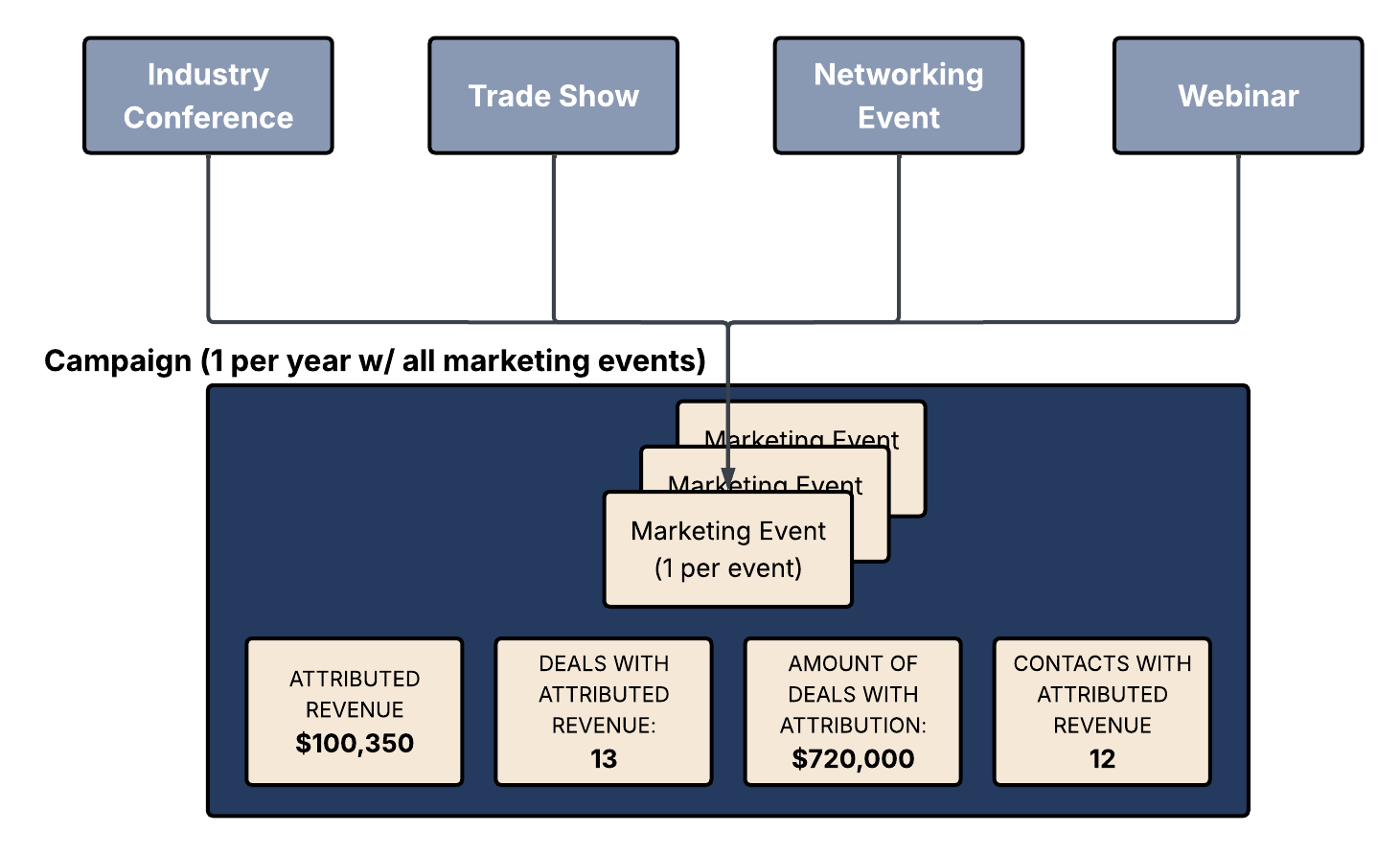
A Marketing Event tells HubSpot that someone participated in a specific event. A HubSpot Campaign connects that event to the broader collection of marketing activities supporting a shared objective.
HubSpot is evolving its campaign experience through Marketing Studio, so depending on your portal, you may be working in the traditional Campaigns tool or the newer Marketing Studio interface. The underlying strategy is the same: bring related marketing activities together so their performance can be evaluated collectively.
For an event-focused marketing program, I often recommend starting with one overarching annual campaign and associating individual Marketing Events with it.
For example:
2027 Events & Field Marketing Campaign
- Industry Conference — January
- Trade Show — March
- Regional Networking Event — June
- Industry Webinar — September
- Annual Customer Conference — November
This gives Marketing a consolidated view of event activity without requiring an entirely new campaign structure for every conference, trade show, or networking opportunity.
Of course, larger flagship events with their own budgets, objectives, and substantial promotional activity may warrant dedicated campaigns. The goal is to create a reporting structure that matches how your team actually markets, without introducing unnecessary administrative work.
Don't Forget the Marketing That Happens Around the Event
One of the most valuable aspects of HubSpot Campaigns and Marketing Studio is that you're not limited to tracking the event itself.
Think about everything your team does to promote and support an event:
- Before the event: Social media posts, invitation emails (through marketing emails or sequences), registration landing pages, forms, and promotional content.
- During the event: Event registrations, attendance, meetings, and engagement.
- After the event: Follow-up emails, relevant marketing workflows, recap content, and continued nurturing.
Supported marketing assets can be associated with the same campaign, creating a more holistic picture of the marketing effort. Sales sequences and one-to-one outreach should still be tracked, but they shouldn't automatically be assumed to contribute to native campaign attribution in the same way as supported marketing assets.
This is especially important because the event itself might not be the touchpoint that ultimately drives conversion.
A prospect might first discover your organization through a LinkedIn post promoting a conference, visit your website, attend the event, and then engage with a follow-up email three weeks later.
When those interactions are connected, Marketing has a much stronger foundation for understanding its contribution to the buyer journey.
HubSpot Knowledge Base: Understand Campaigns
Add Event Costs to Better Understand Marketing ROI
If you're going to measure event performance, you should also consider what it costs to participate.
HubSpot's campaign budget and spend functionality allows marketers to record expenses associated with a campaign, including costs such as:
- Sponsorship and exhibitor fees
- Booth production and event materials
- Travel and accommodations
- Promotional and advertising expenses
- Other event-related costs
By capturing those costs, Marketing can evaluate spend alongside campaign performance and available revenue attribution metrics.
There is an important distinction here: influenced revenue, attributed revenue, and return on investment are not interchangeable metrics. A campaign may influence a deal without receiving credit for its revenue under a particular attribution model.
For an annual campaign containing multiple events, you'll also want to think about whether you need event-level cost comparisons. A consolidated campaign is excellent for program-level visibility, but it won't automatically provide a complete event-by-event ROI calculation.
HubSpot Knowledge Base: Manage Your Campaign Budget
From Event Attendance to Marketing-Influenced Revenue
This is where the conversation starts to shift from how many people attended? to how did our marketing contribute to business outcomes?
Depending on your HubSpot subscription, data quality, and reporting configuration, campaign reporting can help you evaluate metrics such as:
| Metric | What it helps you understand |
|---|---|
| Influenced contacts | Which contacts engaged with the campaign |
| Deals associated with influenced contacts | Which sales opportunities involve those contacts |
| Revenue attribution | How much closed-won revenue receives campaign credit under the available attribution model |
| Campaign spend and ROI | How campaign costs compare with the revenue metrics supported by your setup |
And don't limit this thinking to new business.
For many B2B organizations, conferences, customer events, and networking opportunities also strengthen existing relationships. They may contribute to expansion opportunities, renewals, referrals, and long-term customer engagement.
Marketing's value doesn't stop once a prospect becomes a customer. Your measurement strategy shouldn't stop there either.
Just remember that influence is evidence of engagement, not proof of causation. Revenue attribution is more specific and depends on HubSpot's supported interactions and attribution rules.
HubSpot Knowledge Base: Analyze Campaign Performance in Marketing Studio
A Practical Approach That Doesn't Create More Work for Marketing
I believe strongly in building CRM processes that people will actually maintain. If tracking an event requires a dozen manual steps, it probably won't happen consistently.
For teams getting started, I'd recommend keeping it simple:
- Create an annual Events & Field Marketing campaign in HubSpot Campaigns or Marketing Studio.
- Create an individual Marketing Event for each conference, trade show, webinar, or networking event.
- Import event participants with the correct registration or attendance status, or use a supported integration.
- Associate the event and relevant marketing assets with your campaign.
- Record campaign expenses and review performance regularly, validating what your reporting actually measures.
That's a manageable starting point, even for a marketing team attending dozens of events each year.
You can expand the process over time by adding event engagement to lead scoring, creating follow-up automation, standardizing event naming conventions, and developing more detailed reporting.
HubSpot Knowledge Base: Import Marketing Event Participants
Your Marketing Channels Shouldn't Live in Silos
I've worked in marketing long enough to know that proving ROI is rarely as straightforward as connecting a single activity to a single sale. And my experience in the events industry has reinforced just how much meaningful relationship-building happens outside of digital channels.
A conversation at a conference may not turn into a deal tomorrow. It might, however, lead to an email exchange, a product demonstration, an opportunity six months later, or a stronger customer relationship.
If those interactions never make it into your CRM, you're missing part of the story.
HubSpot Marketing Events, Campaigns, and Marketing Studio provide an opportunity to bring that story together. You don't need a perfect attribution model on day one. You need a practical process that captures engagement, connects your channels, and makes Marketing's contribution more visible over time.
And sometimes, that starts with something as simple as importing your next event attendee list the right way.